
TurboFieldfare is a tool for running Gemma 4 26B-A4B locally on an Apple Silicon Mac. It provides a native Mac app where users can enter text and ask the model to generate a response. The author’s README explains that it does not need to load the entire model into memory at once.
Rewriting work instructions, organising key points from learning materials and explaining terminology are possible uses to try, rather than results verified for this article. Understanding this capability means looking beyond whether it runs: you also need to know what the figures measure and whether the results suit your work.
First, distinguish three kinds of evidence
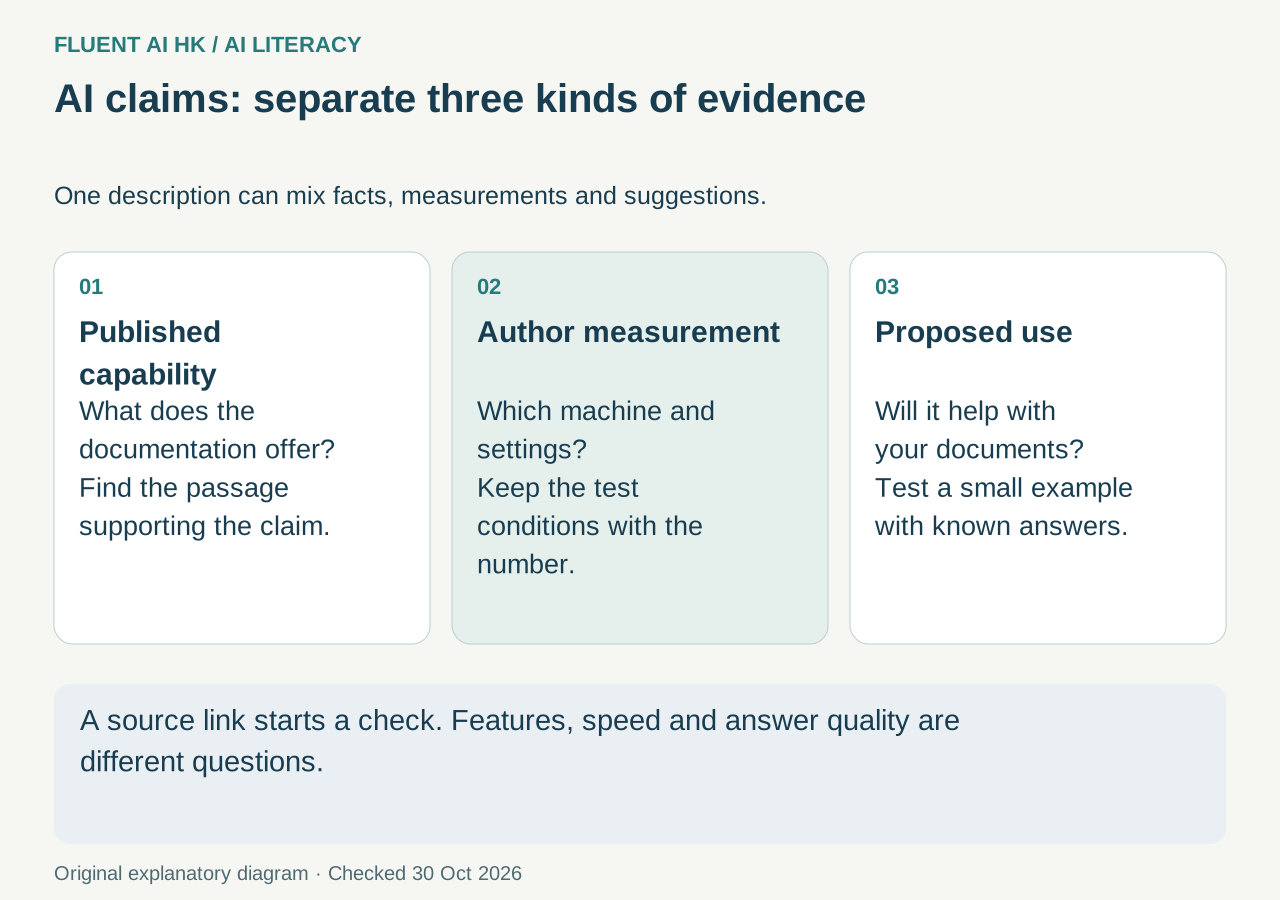
When reading a tool introduction, you can divide its claims into three categories:
- Explicit statements in the source: For example, the README lists a Mac app and a command-line interface. This supports what is provided; it does not mean we have tried it.
- The author’s tests: For example, the generation speed the author measured on a specified computer. This is a useful reference, but it is not a guarantee for every computer.
- Editorial inferences: For example, “You could try using it to organise guidance for new staff.” This is a suggested application based on the capability, and the quality of the output still needs checking.
A link to an original source does not mean that the source supports the entire introduction. Find the supporting statement for each claim, paying particular attention to qualifications such as “about”, “optional” and “experimental”.
This distinction also applies to chat tools. Google’s guidance on Gemini sources explains that related links may cover only part of a response, and that not every response includes sources. Another official Google explanation also warns that Gemini may describe its own operation inaccurately. So even an AI’s answer to “Did you verify this?” needs external evidence to support it.
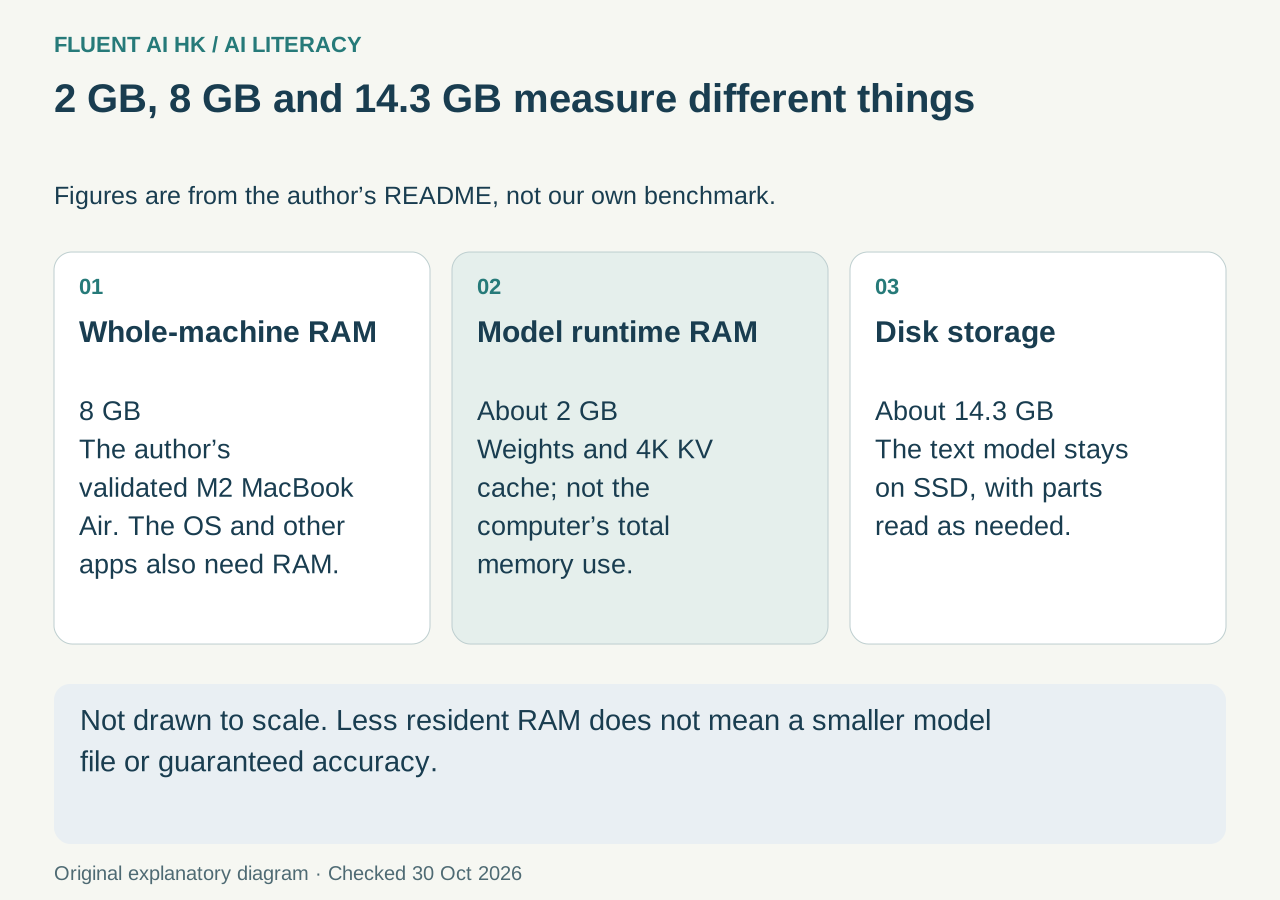
About 2GB, 8GB and 14.3GB measure different things
According to the author’s resource usage explanation, these three figures should be understood separately:
- About 2GB: The memory usage listed by the author for model weights and a 4K KV cache. A KV cache is temporary storage for calculations retained while generating text; this figure is not the total memory requirement for the whole computer.
- 8GB: The total RAM in the M2 MacBook Air used as the author’s validation target. RAM is the memory a computer uses while working.
- About 14.3GB: The disk space occupied by the text model installation, rather than RAM.
The tool keeps a shared core of about 1.35GB and the cache described above in memory, then reads the parts of the model needed for generation from the SSD. Put simply, it brings in data as needed instead of keeping the whole model in RAM.
So “runs in about 2GB” cannot be rewritten as “only needs a computer with 2GB of memory”. Nor does it mean that the model files have shrunk to 2GB.
Running, running quickly and answering accurately are three separate questions
The author’s measurement table in the README lists a text generation speed of 5.1–6.3 tokens per second on an 8GB M2 MacBook Air. A token is a small unit of text processed by the model; it cannot be treated directly as a count of Chinese characters.
These are the author’s reported results, not tests conducted by Fluent AI HK. The source also notes that input length, generated length, cache state and hardware affect speed. More importantly, speed figures do not tell you whether a summary leaves anything out or whether an explanation is correct. They cannot be used to calculate answer accuracy.
Before use, check the requirements and the scope of each claim
The source’s requirements include an Apple Silicon Mac, macOS 26, Metal 4, and Apple development tools with Swift 6.2 or later and the macOS 26 SDK or newer. The first model installation requires an internet connection, and storage space must be reserved for the model. This is not a tool that can simply run on any old Mac.
Account requirements also need to be read in context. The README’s statement that “no Apple developer account is required” refers to its method of building the app. It cannot be extended to mean that all related services are free. This article also discusses only the model specified in the source, without applying the results to other versions.
The author’s README was checked for this article on 30 October 2026. The date a document was accessed cannot be treated as the tool’s official launch date. This is another easily overlooked point when checking AI news.
Workplace application: turn rules into guidance for new staff
Administrative staff can use non-confidential sample material to assess how well the tool organises text. For example, enter: “Borrowing equipment requires supervisor confirmation; accessories must be included when returning it. The procedure for handling damage is still to be added.” Ask the model to turn this into easy-to-read guidance for new staff while keeping unresolved points clear.
When checking the result, look beyond whether it reads smoothly. Has it retained the requirements for supervisor confirmation and accessories? Has it added compensation amounts or deadlines of its own? Has “still to be added” been presented as an established procedure?
This exercise tests reliability for a particular task; it does not prove that the tool suits every company document. The author also warns that the model may repeat itself or give incorrect answers. Running locally does not guarantee correct content.
Short exercise: label three claims
Label “provides a native Mac app”, “the author measured a specified speed on an 8GB M2” and “suitable for organising departmental handover documents” as an explicit source statement, an author test and an application inference, respectively. Then write down one condition to check for each.
Learning about AI means more than finding a tool that works. It also means knowing how far the evidence supports a claim and what you still need to verify. To practise choosing tools, asking clear questions and checking results step by step, continue with Fluent AI HK’s free 12-chapter AI course.
Join the discussion
CommunitySign in to share an idea or question. Comments appear after review.
Sign in to comment