
Claude Code is an AI tool from Anthropic that can help with programming tasks and documenting legacy systems. For colleagues who do not write code, its practical significance is helping technical teams turn system information that is difficult to take over into documentation people can consult, giving handovers a clearer starting point.
But what do familiar claims such as “quick to get started” and “saves a lot of time” actually mean? Anthropic’s government partnership announcement and use cases offer a starting point for learning to assess capabilities, conditions of use and evidence of results separately. The following discussion is based on the limited source excerpts provided in the research package, rather than testing by Fluent AI HK.
The announcement says that a US state IT director used Claude Code to document 12 legacy code repositories, map 467 database tables and flag 27 risks. A “code repository” can be understood as a central place for storing a system’s code. A “database table” stores records in columns, such as product number, name and quantity.
This case illustrates three practical uses:
- Adding system documentation: Turn old code that lacks explanations into written documentation that someone taking over can consult. Someone familiar with the system still needs to check the content.
- Mapping database tables: Help a team understand which tables a system involves. Table names are only clues; their actual purposes need to be checked against the system.
- Organising potential risks for review: Pass issues flagged by the tool to technical staff for inspection. “Flagged 27 risks” cannot simply be read as 27 confirmed vulnerabilities, let alone 27 completed fixes.
All three uses involve technical material. Non-technical colleagues can first list the questions they need answered during a handover, then ask the development team to assess which material is suitable for the tool to process.
The announcement also provides figures from a developer pilot in Utah: 34 developers across 10 state agencies took part; 80% had a working environment within 30 minutes, and 71% reported saving 20 hours or more by the end of the four-week pilot.
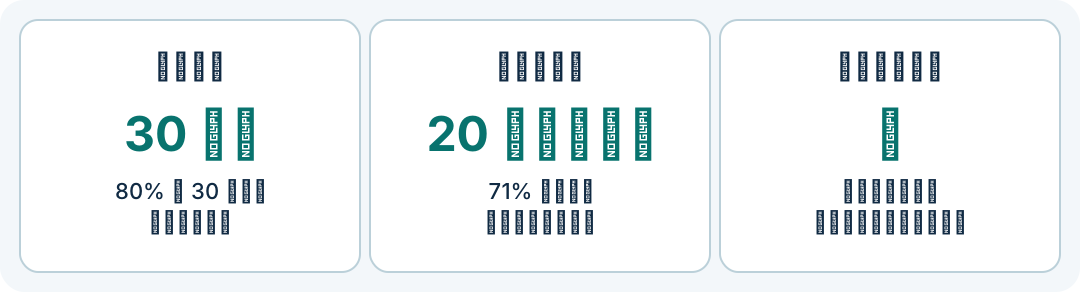
When reading these figures, separate the two measures first. The 30-minute figure describes progress in setting up a working environment. It does not establish that participants could already complete complex tasks independently. The time savings over four weeks were reported by participants; the excerpt does not explain how time was recorded, how many people responded, or whether checking and rework were included.
These details therefore support the statement that “some participants in this pilot reported saving time”, but are insufficient to conclude that “every team will achieve the same results”. The participants were already developers, so their setup speed cannot be directly applied to people with no technical background.
Another potential source of confusion is the quantity of output. Documentation covering 12 repositories indicates the scope of the work. Whether that documentation is complete, and whether someone taking over can use it to find answers, still require separate checks. This is an evaluation approach proposed by the editor based on the documentation case, rather than a quality test result provided in the announcement.
Readers can begin with a checking exercise that does not require using the tool: divide notes on the introduction above into three columns labelled “What was done?”, “Under what conditions?” and “What evidence is there?”. For example, when putting “saved 20 hours or more” in the evidence column, add “reported by participants, four-week pilot”. Then check whether you have accidentally rewritten the finding as a guarantee.
If you are preparing a legacy system handover at work, you could design the following small pilot with technical colleagues. This demonstrates an evaluation method; it does not describe results already achieved:
- Limit the scope: Select a small portion of code and related documentation that can be processed, and clearly state the handover questions to answer, such as “What does this part of the system do?”.
- Keep the basis for checking: Ask technical colleagues to review the output, identify which code or existing documents support each explanation, and note information that is still missing.
- Check practical usefulness: Have another colleague use the documentation to find answers, recording what they can find, what they cannot find and what is easy to misunderstand.
- Count all the time spent: Record the time spent preparing material, generating content, checking and correcting it, then compare the total with the existing approach.
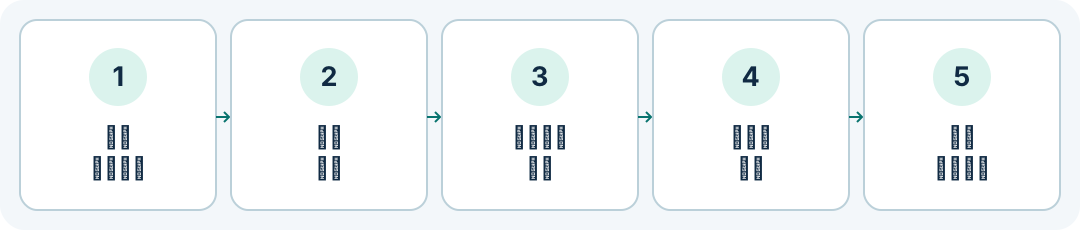
The evidence gathered this way is more relevant to the team’s needs than generation speed alone. Even if the first explanation is produced quickly, any substantial corrections needed afterwards should also be included in the evaluation. Conversely, if the documentation makes it easier for someone taking over to find answers, that is worth recording separately too.
Before starting, the team also needs to check account eligibility, costs and which material may be given to the tool to process. This source focuses on US government partnership arrangements and does not provide complete instructions for general accounts in Hong Kong, so it cannot serve as the basis for an account setup tutorial.
Your next step in understanding AI could begin with a small task whose results can be checked: define the question, check the result, then decide whether continued use is worthwhile. To build a foundation in choosing tools and verifying results, explore Fluent AI HK’s free 12-chapter AI course.
Join the discussion
CommunitySign in to share an idea or question. Comments appear after review.
Sign in to comment